 Physix Frontier
10 documents, 3 versions: I used DeepSeek Harness to figure out which one to read

Last time, I had DeepSeek Harness create a PPT. It took two rounds of troubleshooting, dealing with issues around Chinese fonts and the runtime environment.
This time, I picked something more everyday: organizing project materials.
The folder contained initial requirement drafts, files named "Final," and confirmation drafts added later. Meeting minutes had updated times, but old task lists hadn't been refreshed. If you actually want to continue working, you first need to figure out: Which version are we following right now?
I prepared 10 documents and let it organize them.
The interface showed a duration of 2 minutes 53 seconds, generating 3 result files. The key information for verification—version, venue, and budget—was all handled correctly. No additional correction instructions were needed in this round.
But this doesn't mean you can just throw files in and forward the results directly. Below, I'll lay out the materials, instructions, and the checking process.
01 · Named "Final," But Content Still Unconfirmed
These 10 items are mock materials I prepared for testing, revolving around a fictional internal sharing session. People, amounts, and project dates are fictitious; operations and screenshots are real.
The materials include 3 versions of requirements, 3 sets of meeting minutes, plus an old task list, progress updates, venue alternatives, and a budget draft.
One file is named Requirements_Final.txt, but the body explicitly states "Still pending confirmation from the person in charge." Another is named New Text Document.txt; only upon opening does one realize it's a set of meeting minutes.
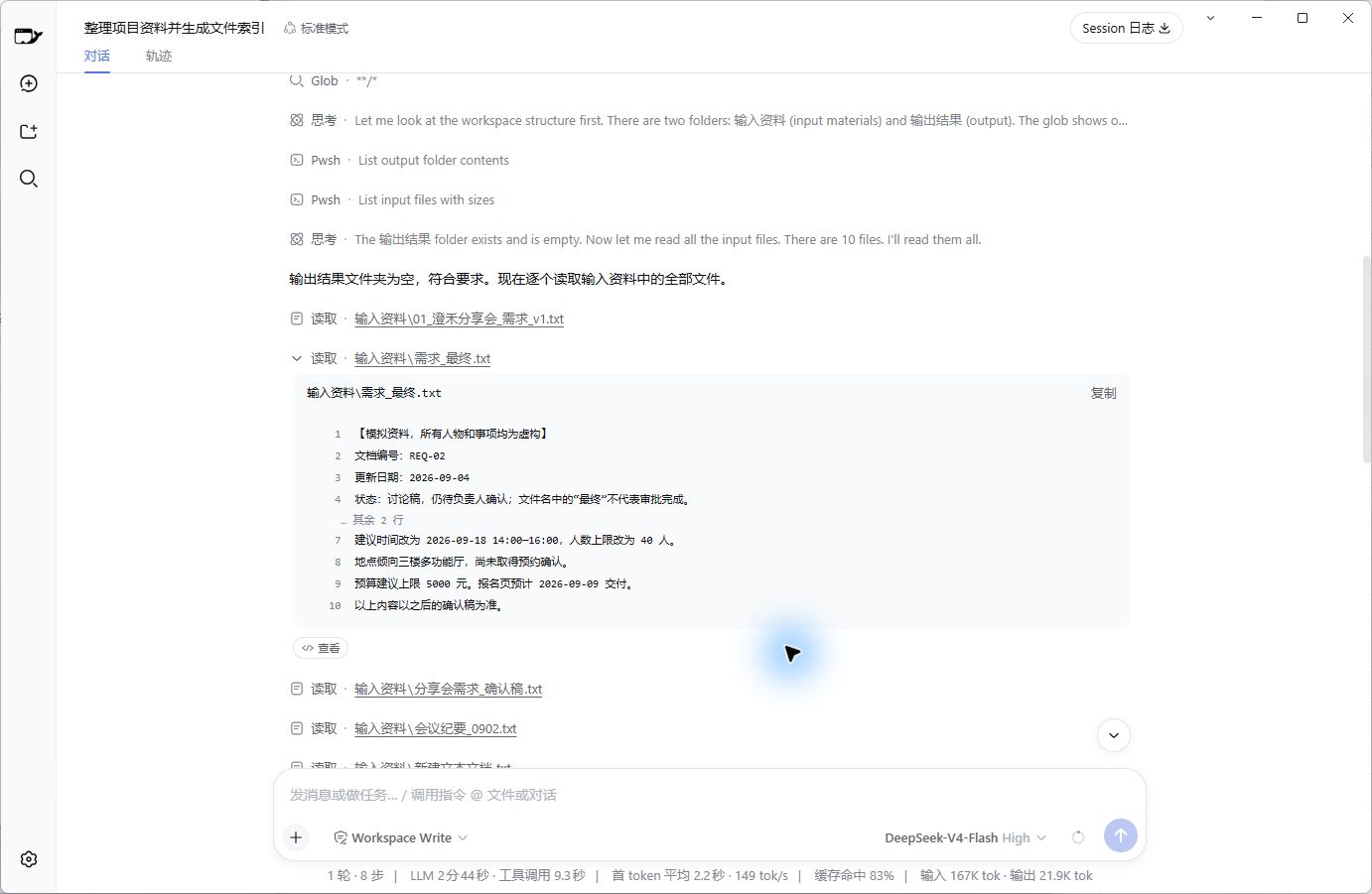
Figure 1 | Real reading interface. Judgment basis lies in the content; filenames only provide clues.
What I wanted to check was: Can it combine content to separate old statements, new decisions, and undecided matters?
First, let's clarify the test difficulty: All 10 items are short .txt files, totaling about 2,600 characters including punctuation and numbers. The text contains clear dates, IDs, and confirmation notes. There were no scanned images, complex tables, or vague chat screenshots.
This is a basic test. Once this hurdle is passed, we can consider increasing the difficulty.
02 · I Asked for Three Files, Each Handling One Task
I created an independent workspace containing only two folders: Input Materials holding these 10 files, and Output Results left empty.
For this round, I selected "Workspace Write," which allows writing files within the workspace. The task also specified: Input cannot be modified, results must be saved separately. Restrictions in the instructions need post-hoc verification and shouldn't be treated as permission settings themselves.
After organization, I hoped to get three things:
• File Index: What files are here, what each covers, and whether they can serve as current references.
• Current Project Facts: What information should be adopted for upcoming work, and where the sources are.
• Conflicts & Pending Confirmations: Why old statements are discarded, and what still needs human confirmation.
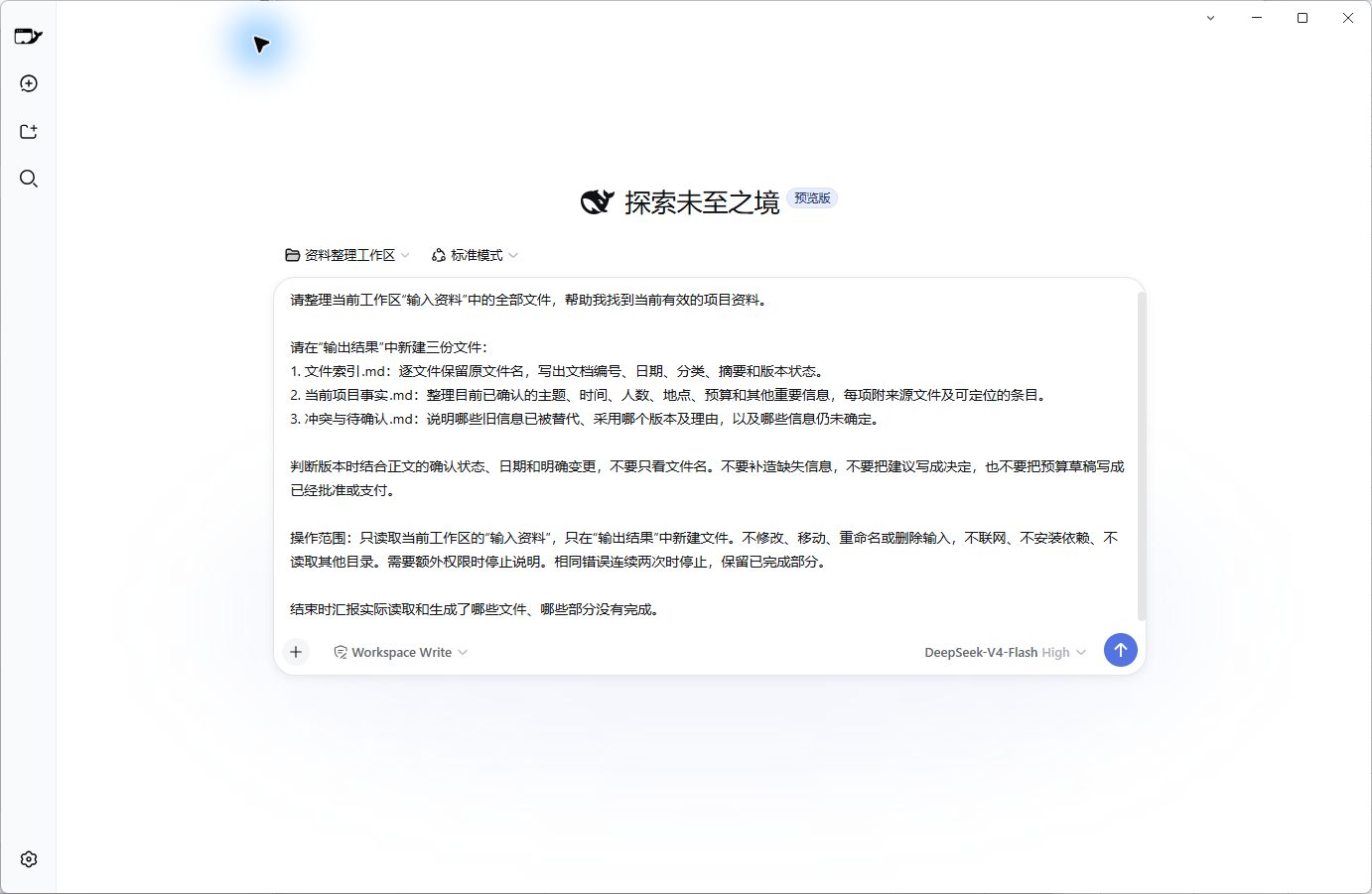
Figure 2 | Instruction actually sent in this round. Model used: DeepSeek-V4-Flash, Reasoning Level: High.
If you want to try it too, here is the complete content sent this time. First, set up the two folders as described above, then copy:
Please organize all files in the "Input Materials" folder of the current workspace to help me find currently valid project materials.
Create three new files in "Output Results":
1. File_Index.md: List original filenames per file, detailing document ID, date, category, summary, and version status.
2. Current_Project_Facts.md: Compile confirmed topics, times, headcounts, locations, budgets, and other key info, attaching source files and locatable entries for each item.
3. Conflicts_And_Pending.md: Explain which old info has been superseded, which version is adopted and why, and which info remains undetermined.
When judging versions, combine confirmation status, dates, and explicit changes in the text; do not rely solely on filenames. Do not fabricate missing info, do not write suggestions as decisions, and do not mark budget drafts as approved or paid.
Scope of operation: Only read "Input Materials" in the current workspace; only create new files in "Output Results." Do not modify, move, rename, or delete inputs. No internet access, no dependency installation, no reading other directories. Stop and explain if extra permissions are needed. Stop after two consecutive identical errors, preserving completed parts.
At the end, report which files were actually read and generated, and which parts were incomplete.
Here, "No internet access" means no additional searching or downloading; calling the configured DeepSeek API itself still requires network connectivity.
The .md suffix indicates Markdown text format, openable by any standard text editor without coding knowledge.
03 · It Delivered Everything, Now We Need to Open and Check
After sending, it read the materials, gradually wrote out three files, and finally listed a completion checklist.
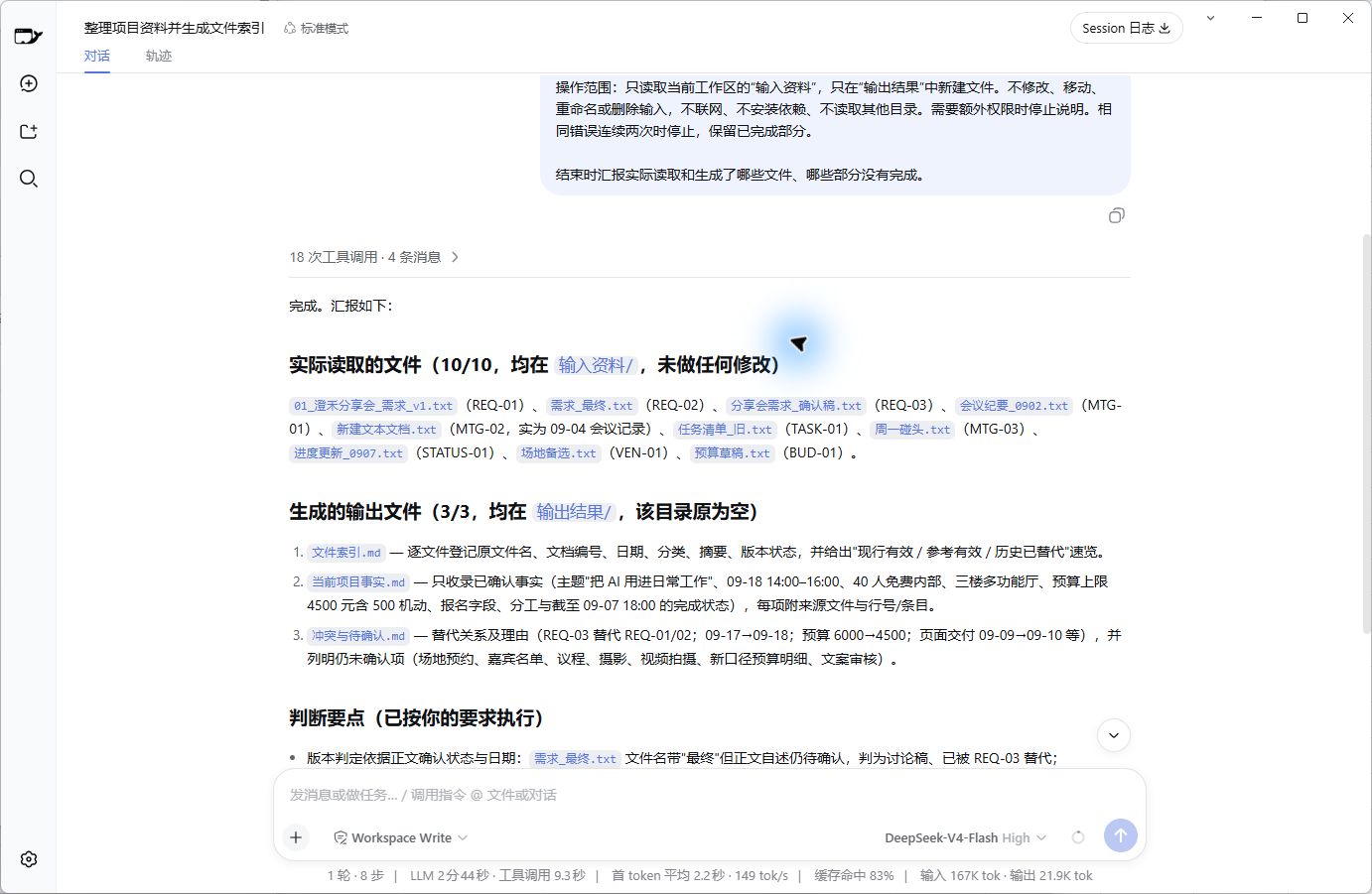
Figure 3 | Actual completion interface. All three results are saved in "Output Results."
I first checked the basics: Did the File Index contain all 10 original filenames? Were the required 3 files actually generated? Comparing before and after running, did the content of the 10 input files remain unchanged?
This step only confirms "Delivery is complete."
Next, I opened Current_Project_Facts.md. It listed the current topic, time, headcount, location, and budget, with source files and line numbers/entries attached to each item. Then looking at Conflicts_And_Pending.md, I could find reasons for adopting newer versions and items that couldn't yet be concluded.
The usefulness of such output is: When seeing a conclusion, you can trace back to the source to verify.
04 · I Focused on Checking These Areas
First area: Was the file named "Final" directly treated as the final decision?
No. It adopted the confirmation draft where the body explicitly stated "Confirmed by person in charge," noting that this draft superseded the previous two requirement versions. The file named "Final" was retained as historical discussion material.
Second area: If a venue was selected, was it written as already booked?
The original materials had selected the 3rd-floor multi-function hall, but progress records indicated the venue provider hadn't provided written confirmation. It separated these two facts: Location selected, booking still pending confirmation.
This distinction is worth checking individually. If it just said "Venue confirmed," whoever takes over might stop following up on the booking.
Third area: In the 4,500 RMB budget, was the 500 RMB contingency double-counted?
Materials mentioned an initial cap of 6,000 RMB, a discussed plan of 5,000 RMB, and finally confirmed 4,500 RMB, which includes a 500 RMB contingency fee.
It adopted 4,500 RMB, didn't add the contingency again, and didn't mark the old budget draft as approved or paid.
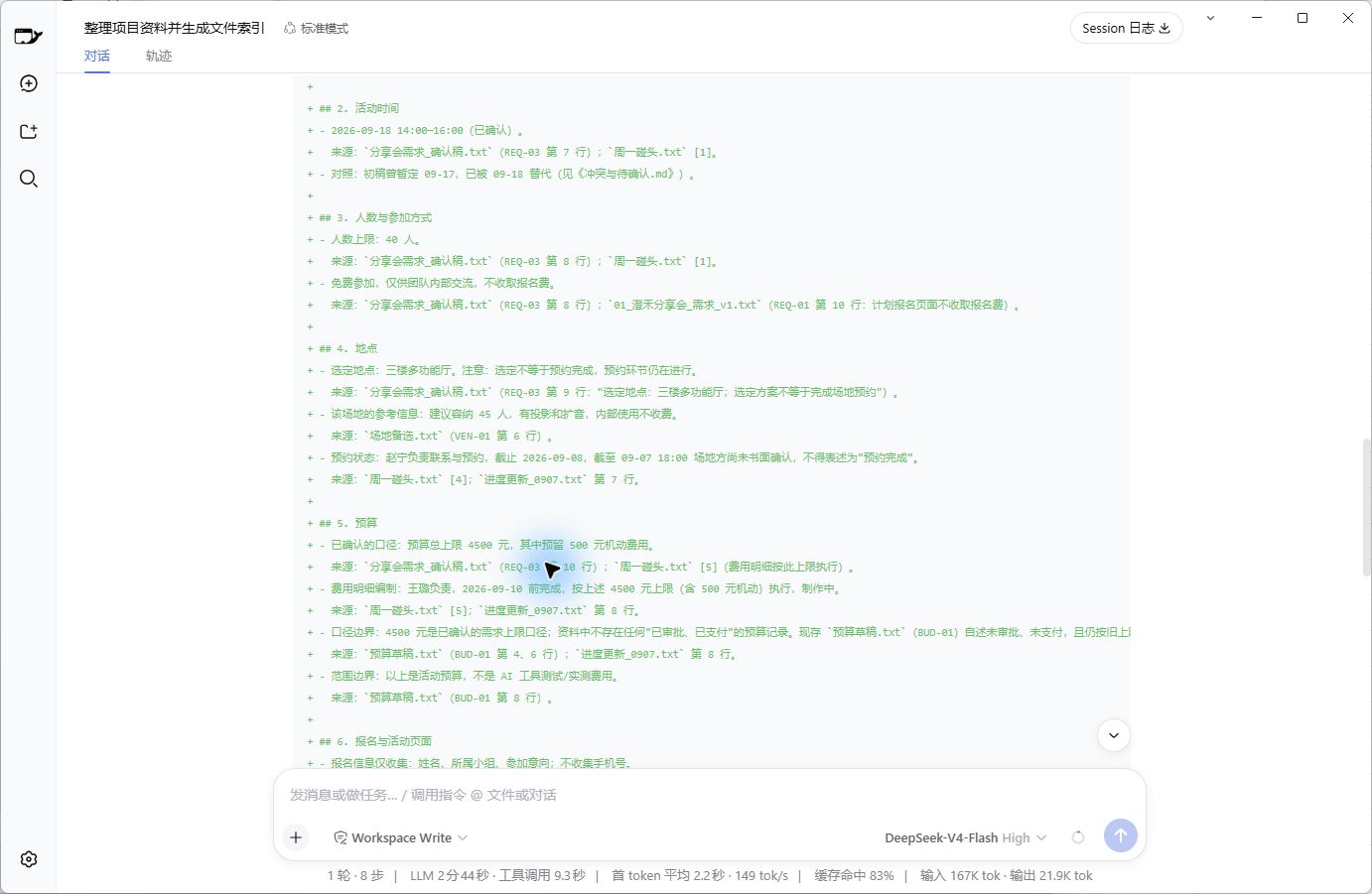
Figure 4 | Real write record of generated files. Venue booking still pending confirmation; budget is 4,500 RMB including 500 RMB contingency.
Other areas were also verified: Event time adopted September 18; headcount limit 40 people; page delivery deadline adopted the changed date of September 10; photography lead and specific agenda were not arbitrarily filled in.
On these key points, no factual errors were found in this round.
When checking yourself, you can also start with information that if wrong, would impact subsequent arrangements: Amounts, dates, persons in charge, completion status. Find the corresponding original text, then confirm if the AI mixed up "Suggestions," "Pending Confirmation," and "Completed."
05 · Under 3 Minutes, Estimated Cost ~0.3 RMB
The interface showed: Duration 2 minutes 53 seconds, 1 round, 8 steps, 18 tool calls. No second correction instruction was sent during the process.
However, 2 minutes 53 seconds is the interface timing for this round, excluding material preparation, result verification, and screenshot organization. These tasks overlapped and weren't timed continuously, so I won't claim "how many minutes were saved."
Costs were also recorded this time.
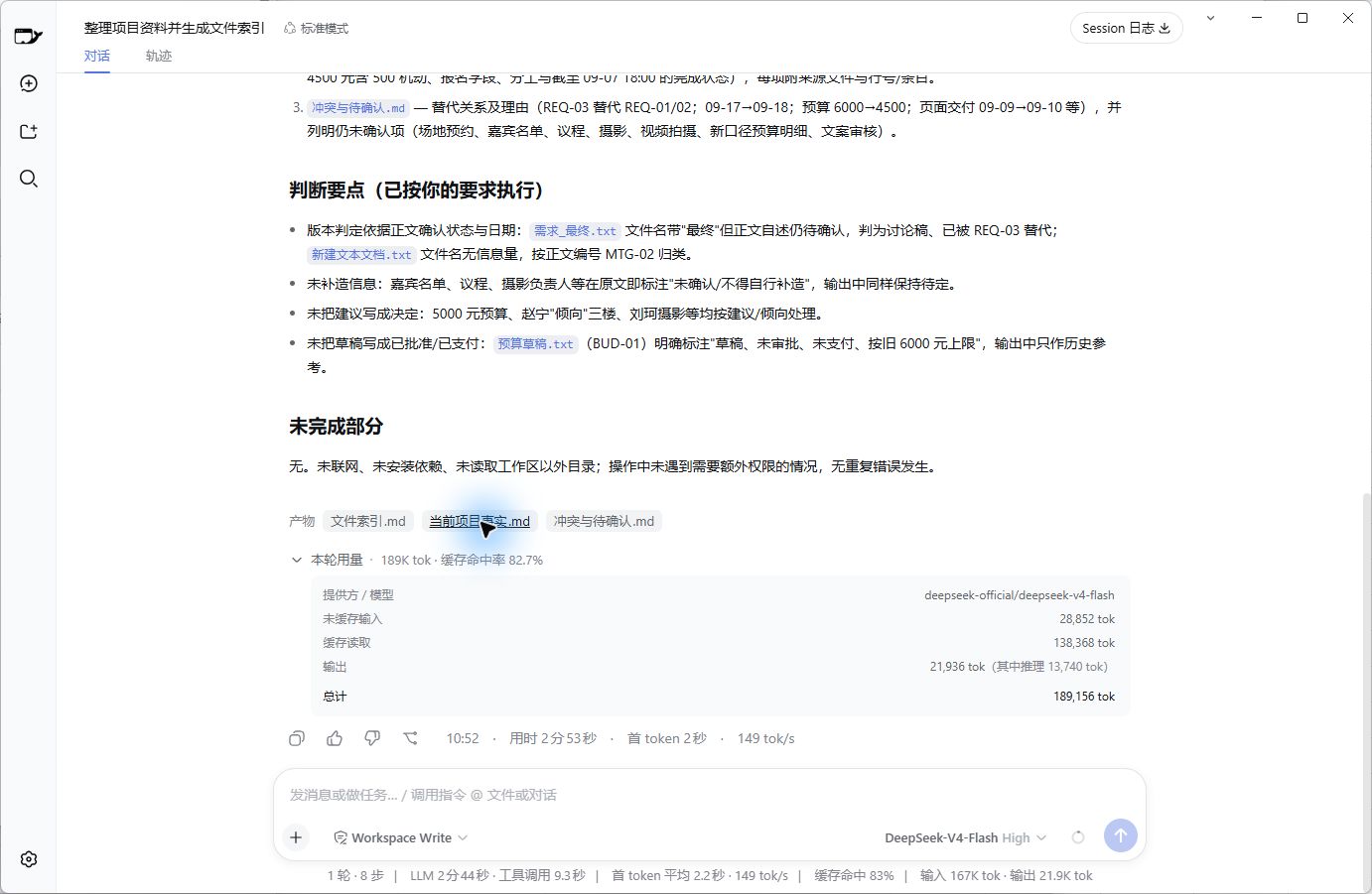
Figure 5 | Usage panel for this round. Cost estimated based on visible token counts; screenshot is not a billing statement.
Panel display: Uncached input 28,852 tokens, Cached read 138,368 tokens, Output 21,936 tokens. Reasoning usage is included in output, not double-counted.
This run occurred on September 7, 2026, at 10:49 AM, falling within the official peak pricing period. Calculated using Flash's price per million tokens for that day (Uncached input 3 RMB, Cached read 0.10 RMB, Output 9 RMB), the total is approximately 0.30 RMB. Price Source: DeepSeek Official Documentation
This is an estimate based on visible usage for this round. Actual account deductions were not verified, nor were other calls hidden from the interface included. Changing models, time periods, or rerunning tasks may alter costs.
The 4,500 RMB in the materials is a fictional event budget, distinct from this API cost.
06 · Next Time I'll Add One Requirement
There was another usability issue in this round: The output was quite long.
10 input files totaled ~2,600 characters; the three result files totaled ~9,900 characters, including titles, source citations, and Markdown tags. Some information repeated across the index, fact table, and conflict explanations.
This relates to my requirements: I specified three files but didn't limit their length.
Next time I'll add: Keep summaries in the index to one or two sentences per file; concentrate detailed facts in one file; conflict tables should only explain differences, not repeat entire project backgrounds. This is a modification planned for the next attempt, unverified in this round.
If asked now whether this kind of material organization is worth continuing with Harness, I'd say yes, keep trying.
With this batch of short texts, it aggregated information into verifiable files, preserved sources, and kept track of "undecided" items. After getting results, I still need to check key fields and follow up with humans for pending confirmations.
As for scanned images, complex tables, or dozens of vaguely worded documents, those weren't tested this time, so no conclusions there.
In the next post, I want to try the same materials: If I shrink these requirements to a single phrase like "Help me organize these materials," how much worse will the results be?
