 Physix Frontier
Test Article: Turn Chaotic Class Notes into Knowledge Trees with AI


Sticker Cover
Your class notes are a mess? Let AI organize them into a knowledge tree
Have you ever had moments like this?
Final exam review, you open your notebook and realize you can't understand your own writing.
Calculus notes are tucked behind English essays; data structure code is mixed with Marxist theory highlights. You don't even remember which class these were taken in.
You aren't careless. You're just too busy. Each class is 45 minutes; teachers speak fast. If you manage to jot things down, that's already good enough. Where would you find time to organize?
But reality is: Unorganized notes are equivalent to no notes. Before exams, you open the book and feel like you never attended class.
Today I'll teach you a trick: Throw scattered notes to AI and let it organize them into a knowledge tree. Get a semester's worth of notes done in 10 minutes.
I. What kind of notes need organizing?
First, judge: Which situation do your notes fall into?
- Stream-of-consciousness type: Recording whatever the teacher says, no highlights from start to finish. Open it up and it's all text; can't find core concepts.
- Fragmented type: Recorded keywords and formulas but no context. Seeing "Bayes' theorem," you completely forget what was discussed at the time.
- Mixed type: Three subjects' content mixed on one page. Calculus formulas next to English words, with a cafeteria menu sandwiched in between.
- Missing type: Didn't take notes for some classes, or stopped halfway when the teacher turned the slide. Knowledge points have gaps and can't connect.
Regardless of the type, AI can help. But prerequisite: You must give it the note content.
Below is the complete workflow.
II. Four Steps to Turn Scattered Notes into a Knowledge Tree
Import Notes
Open WorkBuddy and create a new conversation.
Paste your note content in. If notes are handwritten, take photos and send them; it can recognize them.
If notes are scattered across multiple files (Word, PPT, phone memos), import them all. AI can handle multiple sources simultaneously.
Tip: Label subjects before importing. For example, add a sentence at the beginning: "Here are class notes for Chapters 1-3 of Advanced Mathematics." AI will be more precise when organizing.
Let AI Classify
Send instruction: "Please classify the following notes by knowledge system, list all Level 1 and Level 2 knowledge points, and mark which part each knowledge point belongs to."
AI will first give you a classification framework—telling you which knowledge modules are included in these notes.
Check if the classification is reasonable. If AI puts "Limits" under "Differentiation," tell it "Limits should be before Differentiation; it's the foundation of Differentiation." Correct it once, and it remembers.
Key to this step: Let AI build the framework first, then fill in content. Don't rush to have it organize everything at once.
Generate Knowledge Tree
After confirming the framework, append instruction: "According to this classification framework, expand each knowledge point into a knowledge tree. For each point, list: Definition, Formula/Key Points, Typical Examples, Common Mistakes. Present in tree-indentation format."
AI will generate a complete knowledge tree, expanding layer by layer from Level 1 knowledge points to Level 3 details.
The knowledge tree generated in this step is usually already quite good. But you can continue optimizing—for example, "Add a one-sentence summary for each knowledge point," "Add correct methods next to common mistakes."
Fill Missing Parts
After AI finishes organizing, check for missing knowledge points. You can ask: "Compared to the course syllabus, what content is missing from my notes?"
AI will compare against the course knowledge system it knows and tell you which knowledge points are absent from your notes.
For missing parts, you can ask AI to "supplement the definition and key points for this knowledge point." But note: Content supplemented by AI needs verification; don't trust it entirely.
Finally, export. Copy the knowledge tree into Word or note-taking software and save it. This is your review weapon.
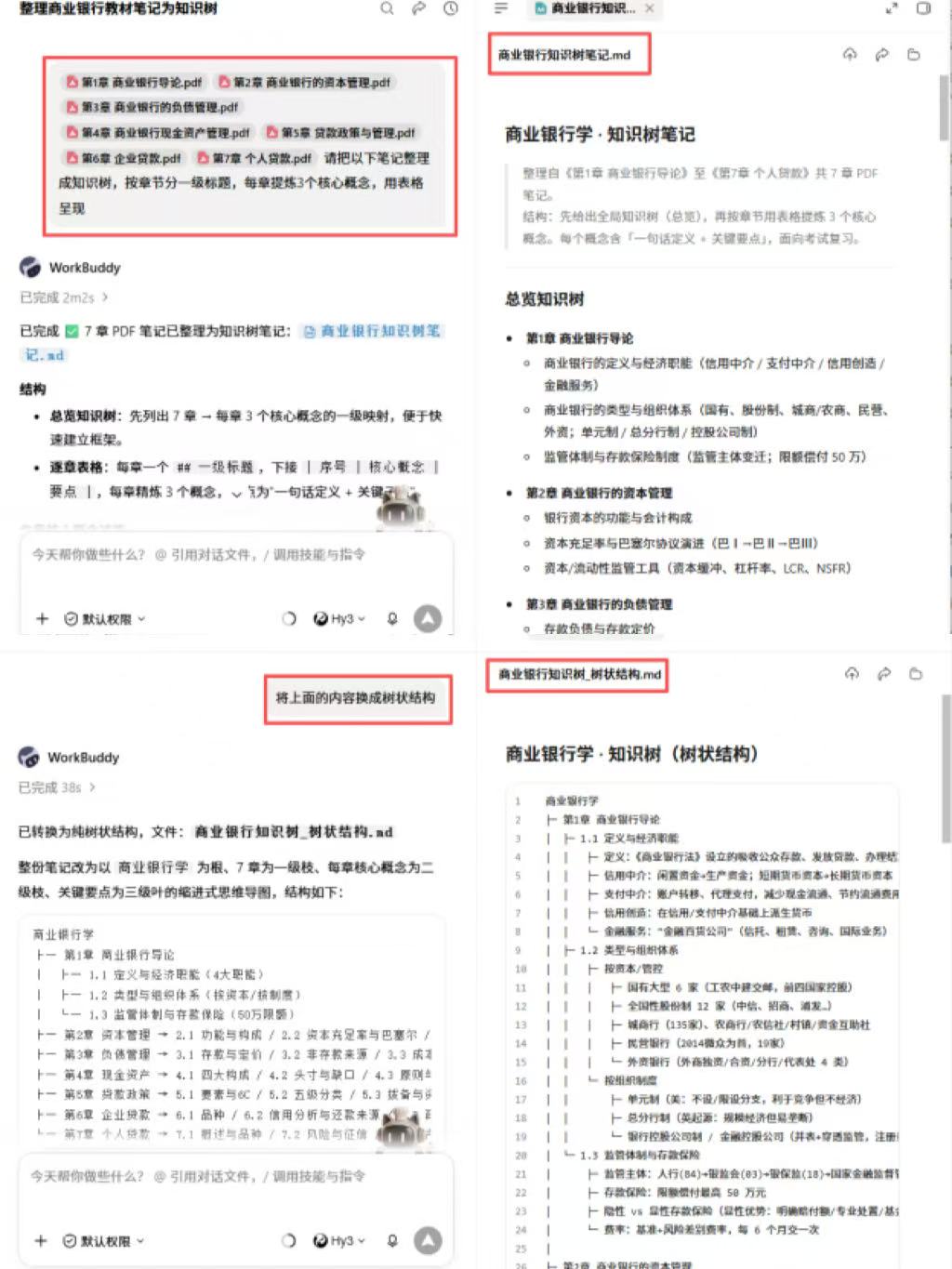 VS
VS 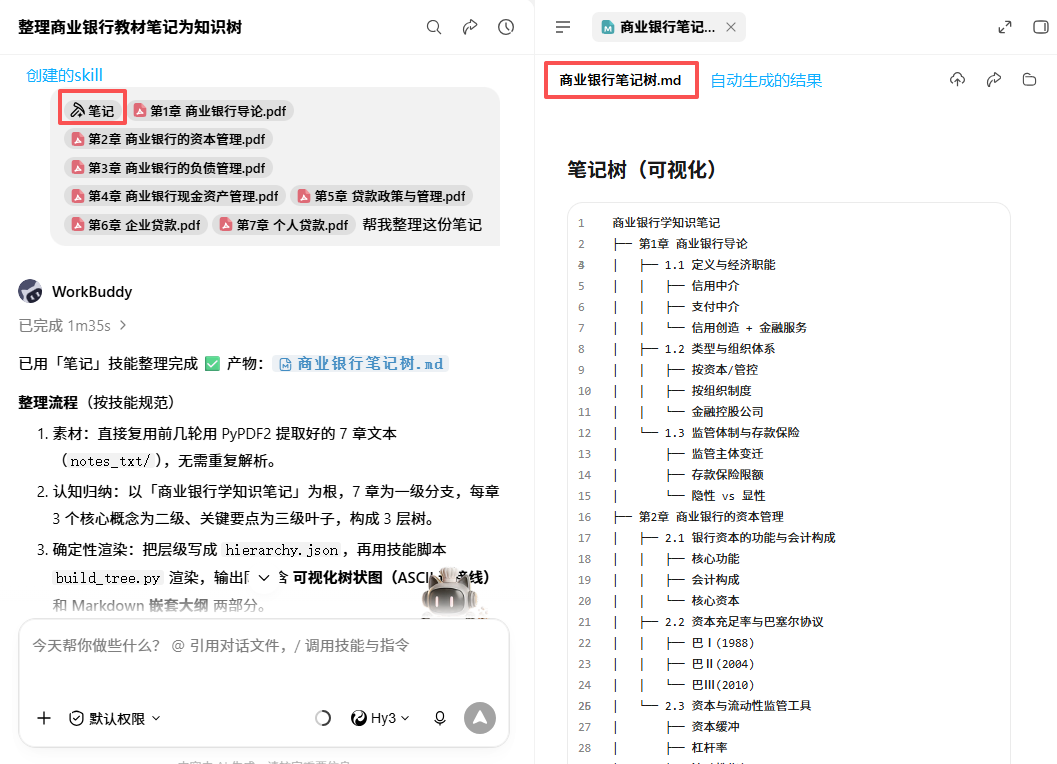
Fig 1 | Effect of converting scattered notes -> knowledge tree
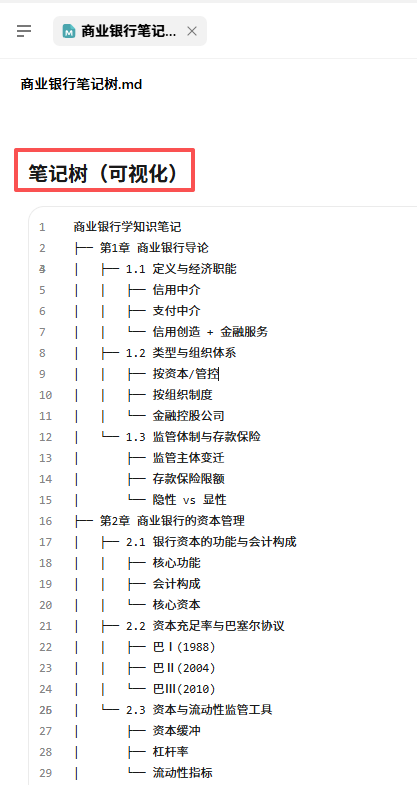
Fig 2 | Example of knowledge tree node structure
III. Linkage with Course Schedule Workspace
Remember the course schedule workspace built on Day 3? Now it can be upgraded.
Link the organized knowledge tree to the workspace—hang a "Knowledge Point Checklist" area under each course.
This way, every time you open the workspace, you don't just see today's classes; you also see which knowledge points for this course have been organized and which haven't.
Operation method: Append instruction in the workspace: "Add a knowledge tree progress area under the Calculus course, showing organized knowledge points (checked) and pending ones (empty boxes)."
AI will automatically extract data from the previously generated knowledge tree and create a progress dashboard. Every time a chapter is organized, the progress updates.
The power of this linkage lies in: No longer needing to switch between multiple tools. Course schedule, notes, knowledge tree, review progress—all in one page.

Fig 3 | Workspace knowledge tree progress linkage
IV. Precautions
- AI-supplemented knowledge points must be verified. AI might "fabricate" a knowledge point not covered in class. Compare with textbooks and confirm before adding to the knowledge tree.
- Knowledge trees are not one-time products. Add new content to the tree after each class. It should be alive, growing with your course progress.
- Don't pursue perfection. It's normal for the first version to have holes. Organize the framework first, fill in slowly later. 60% coverage is ten times better than nothing.
- Printing works better. It's easy to miss details viewing the tree on screen. Export to PDF, print, and annotate key points with a pen for higher review efficiency.
V. Final Words
You take notes not for the sake of taking them, but for using them.
Messy notes sitting there are equivalent to no notes. The moment they are organized into a knowledge tree, your semester's scattered efforts truly become "things usable for review."
What AI saves you isn't just time, but making the act of organizing less painful. Previously you didn't want to organize not because you were lazy, but because you were too tired. Now, 10 minutes is enough.
Tomorrow, go further: Not just organizing one set of notes, but batch processing—handle 10 courseware files in 5 minutes. Efficiency for final exam review doubles starting today.