 Physix Frontier
Digital Human Promo Video Production: Practical Insights
Physix Frontier · Project Retrospective
A Post-Mortem on Producing a 77-Second Digital Human Promo Video
This sub-77-second digital human website promo went through voiceover confirmation, segmented generation, page occlusion issues, navigation cropping, and subtitle/audio-visual synchronization challenges. This article records how MiniMax Design, Liblib, Remotion, HyperFrames, and local audio/video tools divided the work, and which checks are worth doing in advance.
Recently, I created a website promo video for Physix Frontier targeting AI content creators.
The final delivered video is under 77 seconds, but it went through voiceover confirmation, digital human generation, website screen production, subtitle adjustments, transition rework, and checks for two different release versions.
The most representative feedback came from two screenshots of the finished cut: "The character is blocking the page" and "The top of the page isn't fully displayed."
Both issues occurred after the video was already playing normally. The character could speak, and the pages were included, but the content viewers actually needed to see was obscured by the composition.
This article records the useful lessons from this production: how the tools divided responsibilities, where rework tends to happen, and how I ultimately broke down and solved the problems. If you're also planning to create website introductions, product demos, or digital human talking-head videos, you can use this workflow as a starting point.
First, Determine Why the Audience Should Watch
Physix Frontier has entry points for company info, reviews, talent, creator alliances, etc. Initially, it's easy to follow the site navigation and introduce each section one by one, saying "Here's what we have," or "You can click here." But this video is primarily for Bilibili creators (UP masters), and a feature list doesn't answer their most pressing questions.
I anchored the opening on two specific scenarios: You put serious effort into a review video, but once the hype dies down, your work gets buried in the information feed; tutorials are scattered across different platforms, so when viewers stumble upon one piece of content, they can't see the creator's full body of work.
Only then did I introduce the website, explaining how articles, project links, related sections, and creators connect with each other.
There was also an important boundary here: At the time, the website was still building its content. We couldn't write about corporate partnerships, order cases, or revenue promises that hadn't started yet as if they were already realized benefits. The final messaging focused on content display, portfolio accumulation, authentic expression, and co-building participation, without promising orders, traffic, or income just for joining.
Getting these details right first helps determine which pages to showcase and avoids major script changes after recording the digital human talking head.
What Each Tool Was Responsible For
This wasn't done entirely within a single software. In the pre-production phase, I used MiniMax Design to create and confirm the voiceover, then used Liblib to generate the digital human talking-head assets. In post-production, Codex orchestrated the local engineering tasks, handling visuals, subtitles, audio processing, and checks.
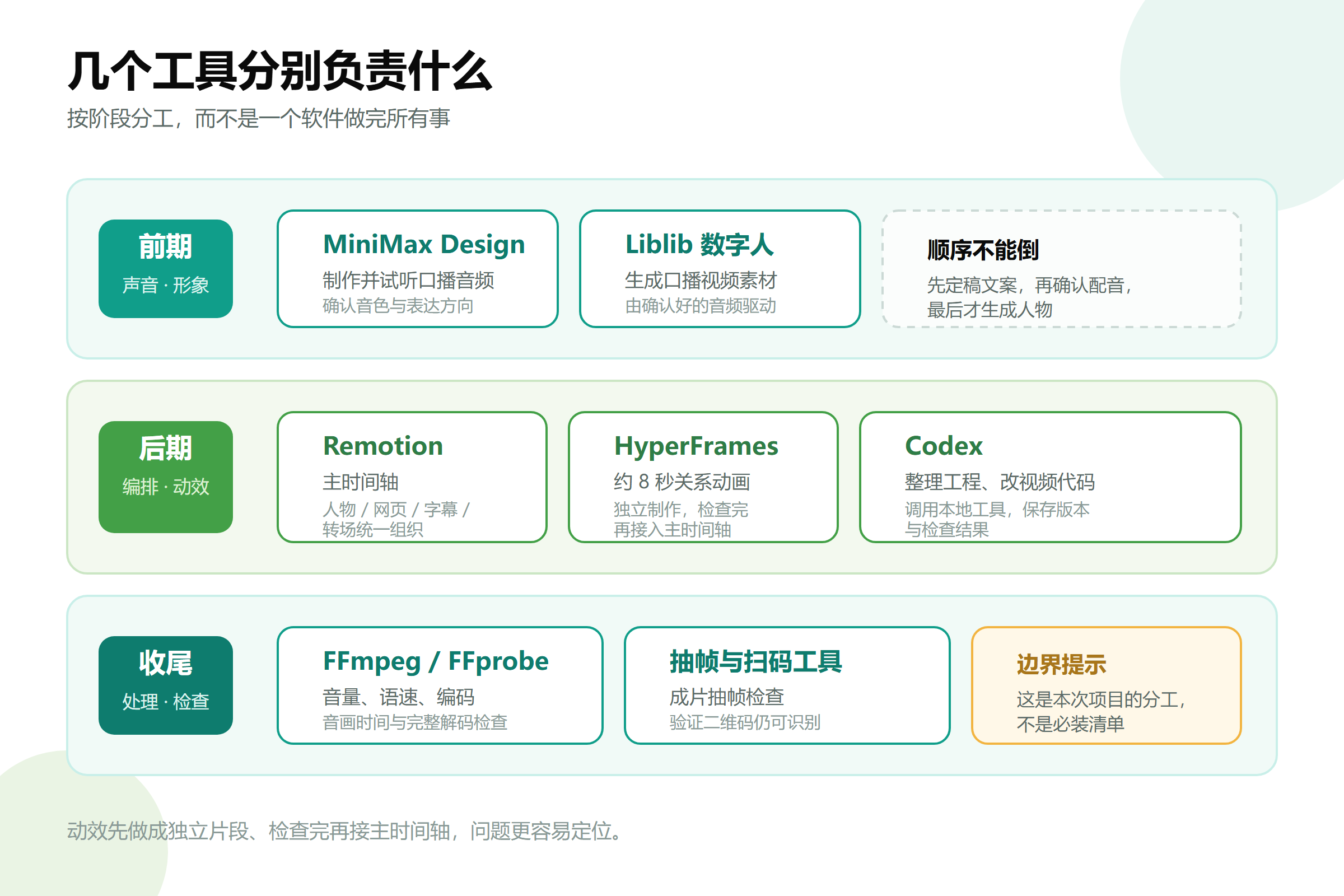
Remotion handled the orchestration of the entire video, while HyperFrames managed an ~8-second relationship animation segment. By creating animations as independent clips first, checking them, and then integrating them into the main timeline, issues are easier to locate.
This diagram shows the division of labor for this specific project, not a checklist that everyone must install. If you only need a static character with subtitles, there's no need to introduce so many steps from the start.
Finalize Voiceover Before Generating Lip-Sync
The most underestimated rework cost in pre-production is changing the script.
Editing text is fast, but generated character videos don't automatically update lip-sync with new scripts. If the new audio says something different, simply replacing the audio track or stretching the video usually isn't enough to fix lip-sync issues.
Therefore, a more reasonable order is: finalize the script, confirm the voiceover, and finally use the confirmed audio to drive the digital human. If significant script changes are needed, regenerate the corresponding talking-head segments or use a workflow that truly supports lip-sync regeneration.
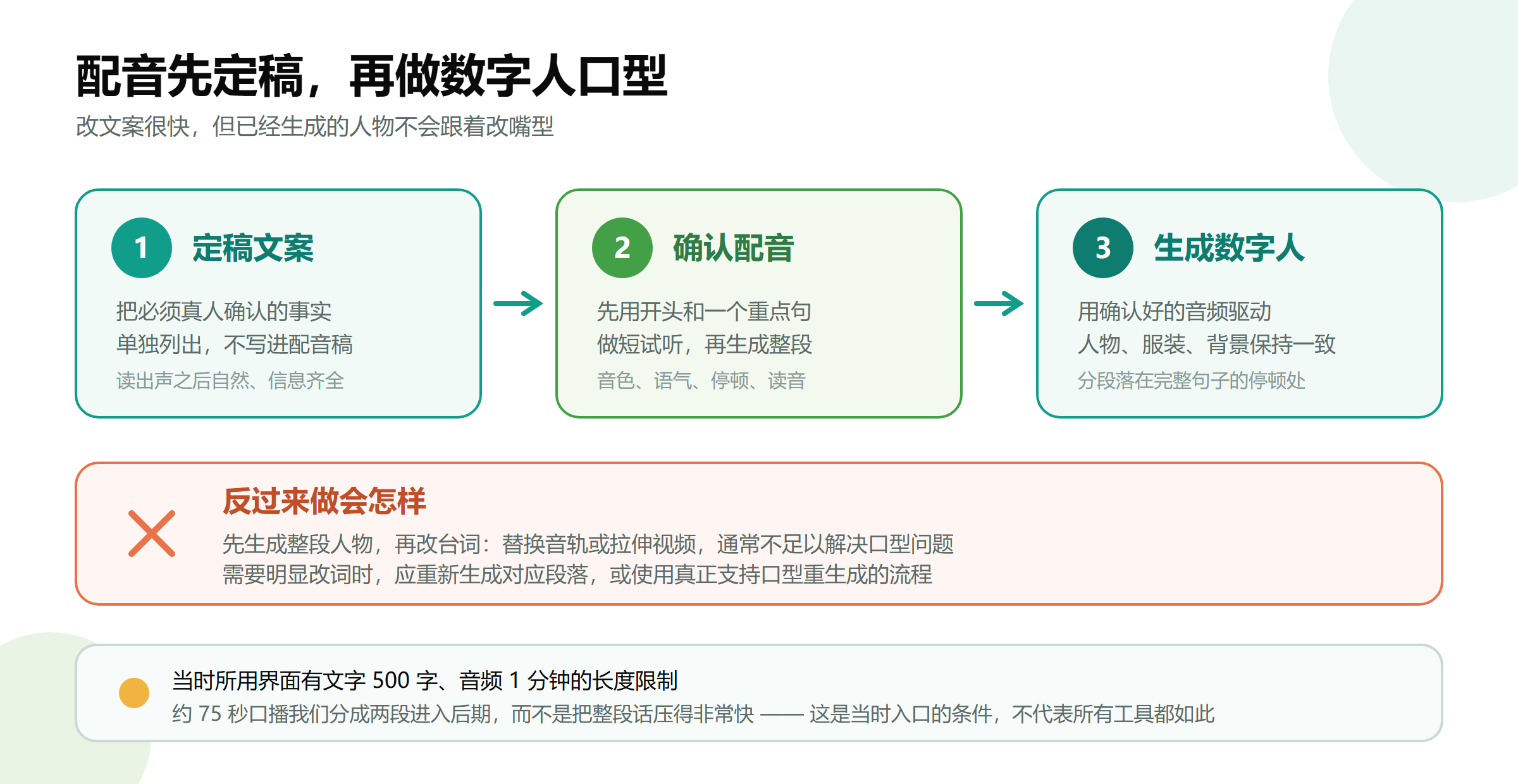
Another limitation I encountered was that the interface at the time had length requirements for text and audio uploads: text under 500 characters, audio upload max one minute, plus file size controls. This refers to the specific entry point used at the time and doesn't imply all models or current plans have the same limits.
To handle the ~75-second narration, I used two asset segments in post-production rather than compressing the entire speech to fit upload limits, which would make it sound rushed.
When splitting segments, it's best to pause at complete sentences; both segments should continue using the same character, clothing, background, composition, and voice. Placing the splice point near a website demo or process explanation can mitigate the abruptness of camera pose changes, but don't rely on obscuring the screen to hide missing dialogue or broken audio.
Adding Energy to the Voice Isn't Just About Volume
The first round of feedback requested a more natural and energetic voice. Here, three distinct issues need to be separated: low volume, flat delivery, and sluggish pacing. They are not the same thing.
Simply increasing volume makes the voice louder but doesn't automatically generate emphasis, emotion, or pauses. Post-production EQ, compression, and slight speed adjustments cannot replace performance during the voiceover stage.
This time, post-production applied restrained processing: reducing some low-frequency muddiness, lightly brightening the vocals, appropriately controlling dynamic range, and speeding up the audio, character visuals, and subtitles together by 4%. The original 80-second composite timeline ended up being approximately 76.97 seconds.

We didn't just speed up the audio while keeping the character video at original speed; otherwise, even if the beginning looked normal, sync issues would gradually appear later.
The processed audio measured an integrated loudness of approximately -14.52 LUFS and a true peak of approximately -1.50 dBTP. The former indicates how loud the whole segment sounds, while the latter observes if there's headroom at the peaks. These are the results for this specific video, not mandatory standards for all platforms.
Background music remained behind the vocals. This video...