 Physix Frontier
An'an Article Test: Your Class Notes a Mess? Let AI Organize Them into a Knowledge Tree

Cover Image
Your Class Notes a Mess? Let AI Organize Them into a Knowledge Tree
Have you ever had this moment—
Reviewing for finals, you open your notebook and realize you can't even understand what you wrote.
Calculus notes are tucked behind English essays, data structure code is mixed with Marxist theory highlights. You don't even remember which class these were taken in.
You're not careless. You're just too busy. With 45-minute classes and teachers speaking fast, if you manage to jot anything down, that's a win. There's no time to organize.
But the reality is: Unorganized notes are equivalent to no notes. Before exams, you open your book and feel like you never attended class.
Today, I'll teach you a trick: Throw your scattered notes to AI and let it organize them into a knowledge tree. Finish organizing a semester's worth of notes in 10 minutes.
I. What Kind of Notes Need Organizing?
First, assess your situation:
- Stream-of-Consciousness Type: You write down whatever the teacher says, with no focus from start to finish. Flip through it, and it's all text with no core concepts visible.
- Fragmented Type: You recorded keywords and formulas but lacked context. Seeing "Bayes' Theorem," you have no memory of what was discussed.
- Mixed Type: One page contains content from three subjects. Calculus formulas sit next to English vocabulary, with a cafeteria menu sandwiched in between.
- Missing Type: You didn't take notes for some classes, or stopped halfway when the teacher turned the slide. There are gaps in the knowledge points that don't connect.
No matter which type, AI can help. But the prerequisite is: You must provide the note content.
Here is the complete workflow.
II. Four Steps to Turn Scattered Notes into a Knowledge Tree
Import Notes
Open WorkBuddy and start a new conversation.
Paste your note content. If handwritten, take a photo and send it; it can recognize the text.
If notes are scattered across multiple files (Word, PPT, phone memos), import them all. AI can process multiple sources simultaneously.
Tip: Label the subject before importing. For example, add a line at the beginning: "Below are class notes for Chapters 1-3 of Advanced Mathematics." This helps AI organize more accurately.
Let AI Categorize
Send the command: "Please categorize the following notes according to the knowledge system, list all primary and secondary knowledge points, and indicate which section each belongs to."
AI will first provide a classification framework—telling you which knowledge modules are contained in your notes.
Check if the classification is reasonable. If AI puts "Limits" under "Differentiation," tell it, "Limits should come before Differentiation as its foundation." Correct it once, and it will remember.
The key here is: Let AI build the framework first, then fill in the content. Don't rush it to organize everything at once.
Generate Knowledge Tree
Once the framework is confirmed, append the command: "Based on this classification framework, expand each knowledge point into a knowledge tree. For each point, list: Definition, Formula/Key Points, Typical Examples, Common Mistakes. Present in a tree-indented format."
AI will generate a complete knowledge tree, expanding layer by layer from primary knowledge points to tertiary details.
The generated tree is usually quite good. But you can continue optimizing—for example, "Add a one-sentence summary for each point" or "Include correct methods next to common mistakes."
Fill Gaps
After AI finishes, check for missing knowledge points. Ask: "Compared to the course syllabus, what content is missing from my notes?"
AI will compare against its known course knowledge system and tell you which points are absent from your notes.
For missing parts, you can ask AI to "supplement the definition and key points for this topic." Note: AI-supplemented content needs verification; don't trust it blindly.
Finally, export. Copy the knowledge tree into Word or your note-taking app and save it. This is your ultimate review tool.
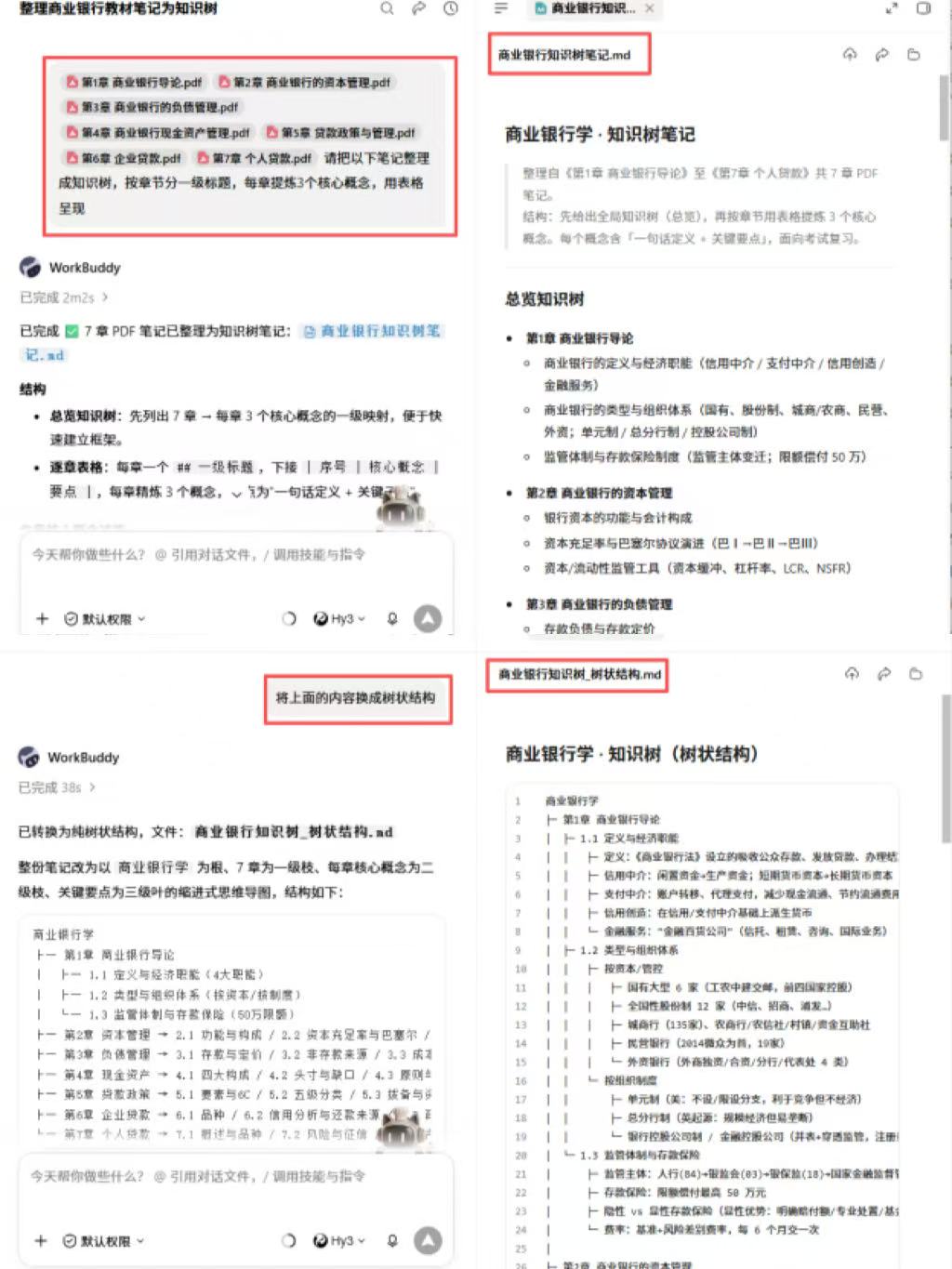 VS
VS 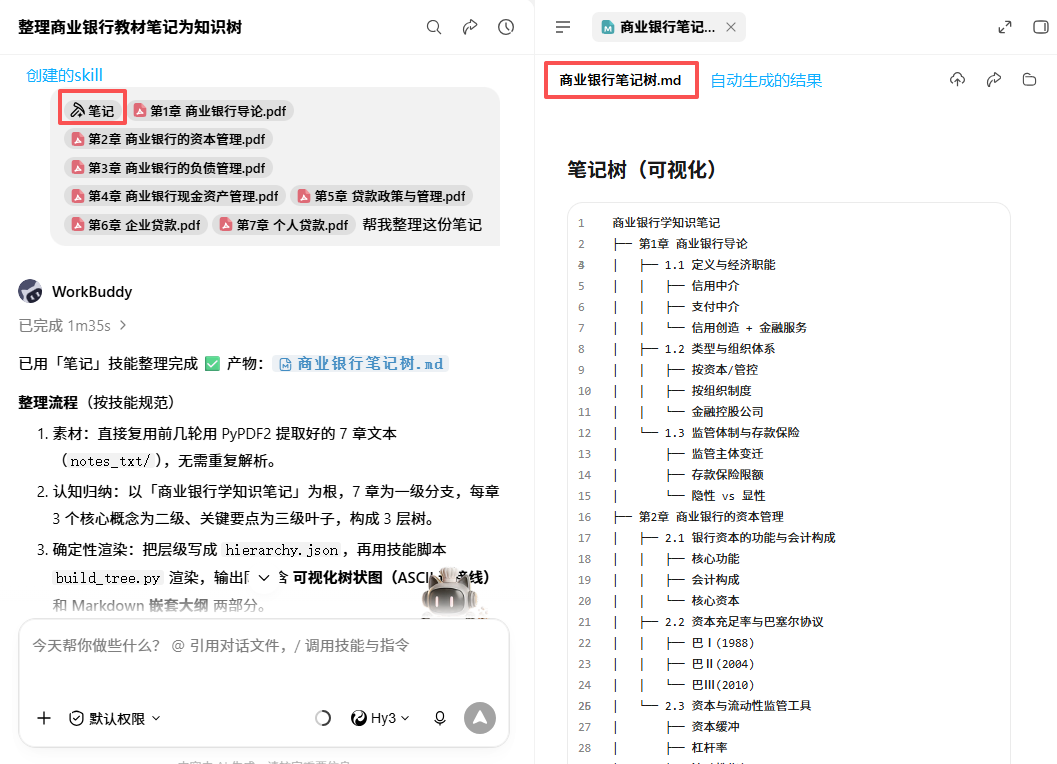
Fig 1 | Effect of converting scattered notes to a knowledge tree
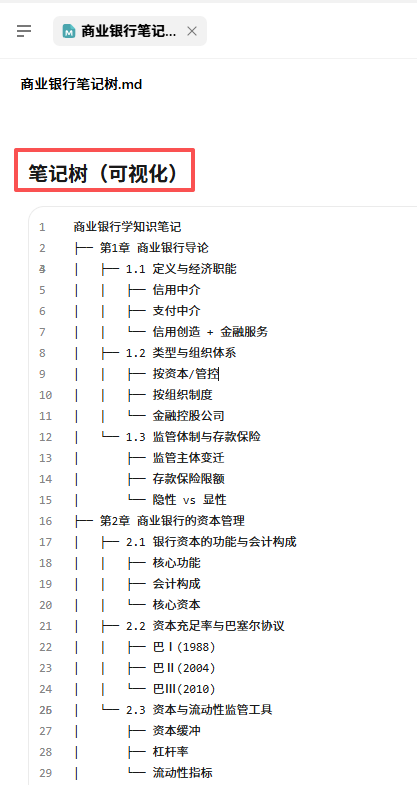
Fig 2 | Example of knowledge tree node structure
III. Integration with Course Schedule Workspace
Remember the course schedule workspace built on Day 3? Now it can be upgraded.
Link the organized knowledge trees to the workspace—attach a "Knowledge Point Checklist" area under each course.